


Buy Latest Jan 12, 2022 Associate-Android-Developer Exam Q&A PDF - One Year Free Update
Download the Latest Associate-Android-Developer Dump - 2022 Associate-Android-Developer Exam Questions
What is the duration, language, and format of the Google Associate Android Developer Certified Exam
- Format: Multiple choices, multiple select
- Passing score: 80%
- Number of Questions: 50-60
- Language: English
- Length of Examination: 120 minutes
NEW QUESTION 20
"workManager" is an instance of WorkManager. Select correct demonstration of WorkRequest cancellation:
- A. WorkRequest request = new OneTimeWorkRequest.Builder(FooWorker.class).build(); workManager.enqueue(request); LiveData<WorkInfo> status = workManager.getWorkInfoByIdLiveData(request.getId ()); status.observe(...);
- B. WorkRequest request = new OneTimeWorkRequest.Builder(FooWorker.class).build(); workManager.enqueue(request); workManager.cancelWorkById(request.getId());
- C. workManager.enqueue(new OneTimeWorkRequest.Builder(FooWorker.class).build());
- D. WorkRequest request = new OneTimeWorkRequest.Builder(FooWorker.class).build(); workManager.enqueue(request); workManager.cancelWork(request);
- E. WorkRequest request1 = new OneTimeWorkRequest.Builder(FooWorker.class).build(); WorkRequest request2 = new OneTimeWorkRequest.Builder(BarWorker.class).build (); WorkRequest request3 = new OneTimeWorkRequest.Builder(BazWorker.class).build (); workManager.beginWith(request1, request2).then(request3).enqueue();
Answer: B
Explanation:
Working with WorkManager, from the 2018 Android Dev Summit WorkManager: Beyond the basics, from the 2019 Android Dev Summit Reference:
https://developer.android.com/reference/androidx/work/WorkManager?hl=en
NEW QUESTION 21
In our TeaViewModel class, that extends ViewModel, we have such prorerty:
val tea: LiveData<Tea>
An observer in our Activity (type of mViewModel variable in example is TeaViewModel) is set in this way:
mViewModel!!.tea.observe(this, Observer { tea: Tea? -> displayTea(tea) }) What will be a correct displayTea method definition?
- A. private fun displayTea(tea: Tea?)
- B. private fun displayTea()
- C. private fun displayTea(tea: LiveData?<Tea>)
- D. private fun displayTea(tea: LiveData?<T>)
Answer: A
NEW QUESTION 22
When your code execution reaches the breakpoint, Android Studio pauses execution of your app. You can
- A. continue running the app normally
- B. advance to the next line in the code (without entering a method)
- C. advance to the first line inside a method call
- D. evaluate an expression at the current execution point
- E. examine the object tree for a variable; expand it in the Variables view. If the Variables view is not visible
- F. advance to the next line outside the current method
Answer: F
NEW QUESTION 23
If you want the Database Inspector to automatically update the data it presents as you interact with your running app, check the Live updates checkbox at the top of the inspector window. While live updates are enabled, what happens with the table in the inspector window?
- A. It becomes read-only, but you cannot see its updated values before updating the data by clicking the Refresh table button at the top of the inspector window.
- B. It is still editable. You can modify data in a table by double-clicking a cell, typing a new value, and pressing Enter.
- C. It becomes read-only and you cannot modify its values.
Answer: C
NEW QUESTION 24
The Testing Pyramid, shown in the Figure, illustrates how your app should include the three categories of tests: small, medium, and large. Medium tests are integration tests that:
- A. validate your app's behavior one class at a time.
- B. validate user journeys spanning multiple modules of your app.
- C. validate either interactions between levels of the stack within a module, or interactions between related modules.
Answer: C
NEW QUESTION 25
As an example. In an Activity we have our TimerViewModel object (extended ViewModel), named mTimerViewModel. mTimerViewModel.getTimer() method returns a LiveData<Long> value. What can be a correct way to set an observer to change UI in case if data was changed?
- A. mTimerViewModel.observe(new Observer<Long>() {
@Override
public void onChanged(Long aLong) {
callAnyChangeUIMethodHere(aLong)
}
}); - B. mTimerViewModel.getTimer().observe(this, new Observer<Long>() {
@Override
public void onChanged(Long aLong) {
callAnyChangeUIMethodHere(aLong)
}
}); - C. mTimerViewModel.getTimer().getValue().toString().observe(new Observer<Long>() {
@Override
public void onChanged(Long aLong) {
callAnyChangeUIMethodHere(aLong)
}
});
Answer: B
NEW QUESTION 26
By executing an allowMainThreadQueries() method to the room database builder RoomDatabase.Builder, we can:
- A. set the database factory
- B. handle database first time creation
- C. disable the main thread query check for Room
- D. handle database opening
Answer: C
NEW QUESTION 27
The easiest way of adding menu items (to specify the options menu for an activity) is inflating an XML file into the Menu via MenuInflater. With menu_main.xml we can do it in this way:
- A. override fun onCreateOptionsMenu(menu: Menu): Boolean { menuInflater.inflate(R.menu.menu_main, menu) return true
} - B. override fun onCreate(savedInstanceState: Bundle?) { super.onCreate(savedInstanceState) setContentView(R.menu.menu_main)
} - C. override fun onOptionsItemSelected(item: MenuItem): Boolean {
menuInflater.inflate(R.menu.menu_main, menu) return super.onOptionsItemSelected(item)
}
Answer: A
Explanation:
Reference:
https://developer.android.com/guide/topics/ui/accessibility/custom-views
NEW QUESTION 28
We have a custom view that extends android.widget.ProgressBar. Our progress bar is not touchable, focusable, etc.: it just shows progress. Style for our custom progress bar extends
"Widget.AppCompat.ProgressBar.Horizontal". An item, named "progressDrawable", in our style, is a xml file . What we usually can see as a main single element in this xml file:
- A. An <ImageView> element with android:id="@+id/progress" identifier
- B. A Layer List (<layer-list> element) with items android:id="@+id/progress" and android:id="@+id/ background" inside it.
- C. A State List (<selector> element )
Answer: B
Explanation:
Reference:
https://developer.android.com/guide/topics/resources/drawable-resource
NEW QUESTION 29
To run a debuggable build variant you must use a build variant that includes
- A. minifyEnabled false in the build configuration
- B. debuggable true in the build configuration
- C. debuggable true or debuggable false in the build configuration
Answer: B
NEW QUESTION 30
About queries in DAO classes. Room verifies the return value of the query such that if the name of the field in the returned object doesn't match the corresponding column names in the query response, Room alerts you in one of the following two ways: (Choose two.)
- A. It gives a warning if no field names match.
- B. It gives an error if only some field names match.
- C. It gives a warning if only some field names match.
- D. It gives an error if no field names match.
Answer: C,D
NEW QUESTION 31
Android Tests. You can use the childSelector() method to nest multiple UiSelector instances. For example, the following code example shows how your test might specify a search to find the first ListView in the currently displayed UI, then search within that ListView to find a UI element with the text property Apps.
What is the correct sample?
- A. val appItem: UiObject = device.findObject( UiSelector().className("android.widget.ListView")
.instance(
UiSelector().text("Apps")
)
) - B. val appItem: UiObject = device.findObject( UiSelector().className("android.widget.ListView")
.instance(0)
.childSelector(
UiSelector().text("Apps")
)
) - C. val appItem: UiObject = device.findObject( UiSelector().className(ListView.class)
.instance(1)
.childSelector(
UiSelector().text("Apps")
)
)
Answer: B
NEW QUESTION 32
What do you want from Room when you create a DAO method and annotate it with @Update?
Example:
@Dao
interface MyDao {
@Update
fun updateUsers(vararg users: User)
}
- A. Room removes a set of entities, given as parameters, from the database. It uses the primary keys to find the entities to delete.
- B. Room generates an implementation that inserts all parameters into the database in a single transaction.
- C. Room modifies a set of entities, given as parameters, in the database. It uses a query that matches against the primary key of each entity.
Answer: C
NEW QUESTION 33
With recommended app architecture. Fill the following diagram, which shows how all the modules usually should interact with one another after designing the app (drag modules to correct places).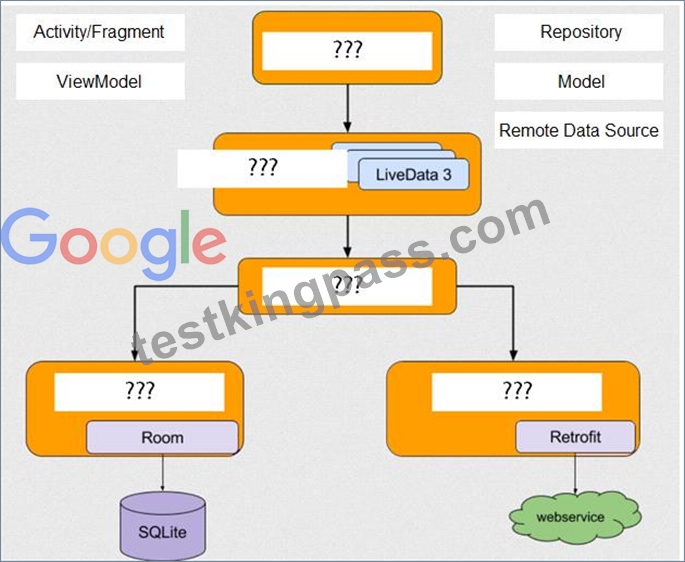
Answer:
Explanation: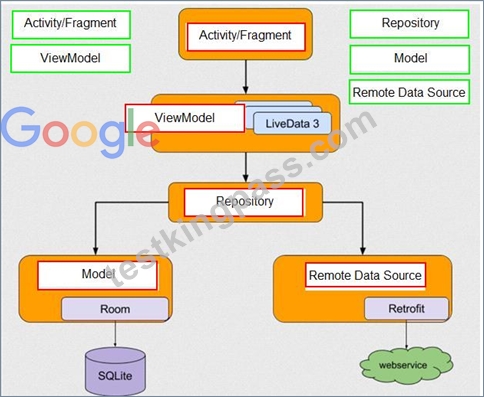
NEW QUESTION 34
In general, you should send an AccessibilityEvent whenever the content of your custom view changes. For example, if you are implementing a custom slider bar that allows a user to select a numeric value by pressing the left or right arrows, your custom view should emit an event of type TYPE_VIEW_TEXT_CHANGED whenever the slider value changes. Which one of the following sample codes demonstrates the use of the sendAccessibilityEvent() method to report this event.
- A. @Override
public boolean onKeyUp (int keyCode, KeyEvent event) {
if (keyCode == KeyEvent.KEYCODE_ENTER) {
currentValue--;
sendAccessibilityEvent(AccessibilityEvent.TYPE_VIEW_CONTEXT_CLICKED);
return true;
}
...
} - B. @Override
public boolean dispatchPopulateAccessibilityEvent(AccessibilityEvent event) { boolean completed = super.dispatchPopulateAccessibilityEvent(event); CharSequence text = getText(); if (!TextUtils.isEmpty(text)) { event.getText().add(text); return true;
}
return completed;
} - C. @Override
public boolean onKeyUp (int keyCode, KeyEvent event) {
if (keyCode == KeyEvent.KEYCODE_DPAD_LEFT) {
currentValue--;
sendAccessibilityEvent(AccessibilityEvent.TYPE_VIEW_TEXT_CHANGED);
return true;
}
...
}
Answer: C
Explanation:
Reference:
https://developer.android.com/guide/topics/ui/accessibility/custom-views
NEW QUESTION 35
......
Google Associate-Android-Developer Exam Syllabus Topics:
| Topic | Details |
|---|---|
| Topic 1 |
|
| Topic 2 |
|
| Topic 3 |
|
| Topic 4 |
|
| Topic 5 |
|
| Topic 6 |
|
| Topic 7 |
|
| Topic 8 |
|
| Topic 9 |
|
| Topic 10 |
|
Verified Associate-Android-Developer Dumps Q&As - 1 Year Free & Quickly Updates: https://www.testkingpass.com/Associate-Android-Developer-testking-dumps.html