


Best Preparations of MD-100 Exam 2021 Windows 10 Unlimited 300 Questions
Focus on MD-100 All-in-One Exam Guide For Quick Preparation.
NEW QUESTION 145
You have a computer that runs Windows 10.
You need to configure a picture password.
What should you do?
- A. From Windows PowerShell, run the Set-LocalUsercmdlet and specify the InputObject parameter.
- B. From the Settings app, configure the Sign-in options.
- C. From the Local Group Policy Editor, configure the Account Policies settings.
- D. From Control Panel, configure the User Accounts settings.
Answer: B
NEW QUESTION 146
You have several computers that run Windows 10.
All users have Microsoft OneDrive for Business installed.
Users frequently save files to their desktop.
You need to ensure that all the users can recover the files on their desktop from OneDrive for Business.
Which two actions should you perform? Each correct answer presents part of the solution.
NOTE: Each correct selection is worth one point.
- A. Copy ADMX and ADML files to C:\Windows\PolicyDefinitions
- B. Configure the Save documents to OneDrive by default setting
- C. Copy ADMX and ADML files to C:\Users\PublicDesktop\
- D. From Backup in the Settings app, add a drive
- E. Configure the Silently move Windows known folders to OneDrive settings
Answer: A,E
Explanation:
Explanation
References:
https://docs.microsoft.com/en-us/onedrive/plan-onedrive-enterprise
https://docs.microsoft.com/en-us/onedrive/use-group-policy#KFMOptInNoWizard
NEW QUESTION 147
You have a computer named Computer1 that runs Windows 7. Computer1 has a local user named User1 who has a customized profile.
On Computer1, you perform a clean installation of Windows 10 without formatting the drives.
You need to migrate the settings of User1 from Windows7 to Windows 10.
Which two actions should you perform? To answer, drag the appropriate actions to the correct targets. Each action may be used once, more than once, or not at all. You may need to drag the split bar between panes or scroll to view content.
NOTE: Each correct selection is worth one point.
Answer:
Explanation: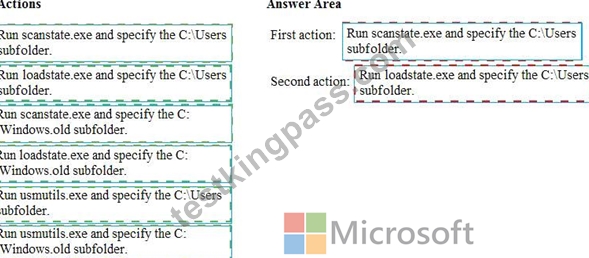
Explanation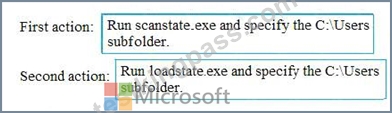
References:
https://docs.microsoft.com/en-us/windows/deployment/usmt/usmt-how-it-works
NEW QUESTION 148
Please wait while the virtual machine loads. Once loaded, you may proceed to the lab section. This may take a few minutes, and the wait time will not be deducted from your overall test time.
When the Next button is available, click it to access the lab section. In this section, you will perform a set of tasks in a live environment. While most functionality will be available to you as it would be in a live environment, some functionality (e.g., copy and paste, ability to navigate to external websites) will not be possible by design.
Scoring is based on the outcome of performing the tasks stated in the lab. In other words, it doesn't matter how you accomplish the task, if you successfully perform it, you will earn credit for that task.
Labs are not timed separately, and this exam may more than one lab that you must complete. You can use as much time as you would like to complete each lab. But, you should manage your time appropriately to ensure that you are able to complete the lab(s) and all other sections of the exam in the time provided.
Please note that once you submit your work by clicking the Next button within a lab, you will NOT be able to return to the lab.
Username and password
Use the following login credentials as needed:
To enter your password, place your cursor in the Enter password box and click on the password below.
Username: Contoso/Administrator
Password: Passw0rd!
The following information is for technical support purposes only:
Lab Instance: 10921597
You need to connect to your company's network and create a VPN connection on Client2 named VPN1 that meets the following requirements:
VPN1 must connect to a server named vpn.contoso.com.
Only traffic to your company's network must be routed through VPN1.
To complete this task, sign in to the required computer or computers.
Answer:
Explanation:
On Client2, click on the Start button and go to settings.
Select Network & Internet.
Select VPN on the left-hand side
Click on the Add a VPN connection button.
Next, select the VPN provider-This will almost always be Windows (built-in).
Name your connection and enter the server name as provided by your IT technician. (VPN1 and vpn.contoso.com).
Add in your username and password as provided by your IT technician.
Click Save when done.
Closeout the PC settings windows.
Reference:
https://www.themillergroup.com/vpn-windows-10/
NEW QUESTION 149
You sign in to a computer that runs Windows 10 Pro.
You need to ensure that after a restart, the computer starts automatically in Safe Mode with Networking.
What should you use to configure the restart options?
- A. bootrec
- B. bootcfg
- C. Windows System Image Manager (Windows SIM)
- D. BCDEdit
Answer: D
Explanation:
Reference:
https://www.lifewire.com/how-to-force-windows-to-restart-in-safe-mode-2625163
NEW QUESTION 150
Your company has a computer named Computer1 that runs Windows 10. Computer1 is used to provide guests with access to the Internet. Computer1 is a member of a workgroup.
You want to configure Computer1 to use a user account sign in automatically when the computer is started. The user must not be prompted for a user name and password.
What should you do?
- A. Run the BCDBoot command.
- B. Run the MSConfig command.
- C. Configure Group Policy preferences.
- D. Edit the Registry.
Answer: D
Explanation:
In the registry, add a default user name and a default password in the HKEY_LOCAL_MACHINE\SOFTWARE\Microsoft\Windows NT\CurrentVersion\Winlogon sbukey.
Reference:
https://support.microsoft.com/en-us/help/324737/how-to-turn-on-automatic-logon-in-windows
NEW QUESTION 151
You have a computer named Computer1 that runs Windows 10. Computer1 belongs to a workgroup.
You run the following commands on Computer1.
New-LocalUser -Name User1 -NoPassword
Add-LocalGroupMember User -Member User1
What is the effect of the configurations?
- A. User1 is prevented from signing in until an administrator manually sets a password for the user.
- B. User1 appears on the sign-in screen and can sign in without a password.
- C. User1 is prevented from signing in until the user is assigned additional user rights.
- D. User1 appears on the sign-in screen and must set a new password on the first sign-in attempts.
Answer: B
Explanation:
Explanation
References:
https://docs.microsoft.com/en-us/powershell/module/microsoft.powershell.localaccounts/new-localuser?
view=powershell-5.1
NEW QUESTION 152
You need to meet the technical requirement for Computer1.
What should you do? To answer, select the appropriate options in the answer area.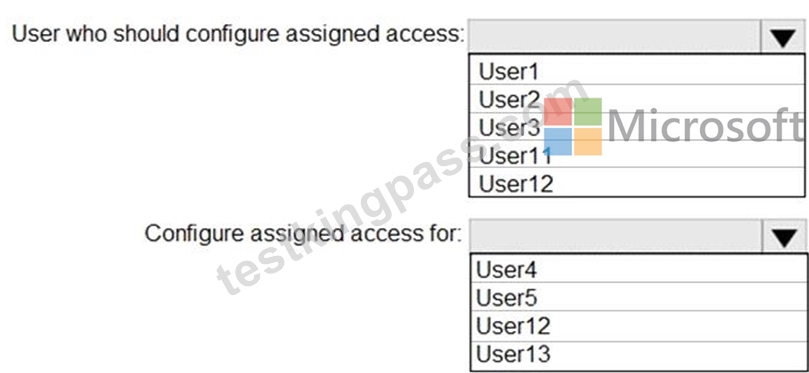
Answer:
Explanation: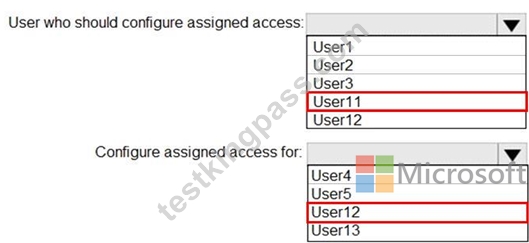
NEW QUESTION 153
You have a computer named Computer1 that runs Windows 10 and has the users shown in the following table.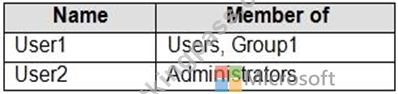
Computer1 contains the folders shown in the following table.
You move Folder1 into Folder2.
For each of the following statements, select Yes if the statement is true. Otherwise, select No.
NOTE: Each correct selection is worth one point.
Answer:
Explanation: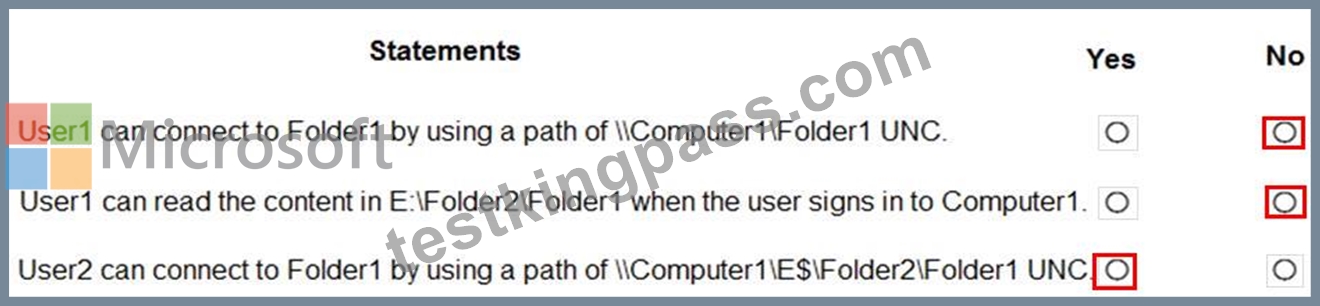
NEW QUESTION 154
Please wait while the virtual machine loads. Once loaded, you may proceed to the lab section. This may take a few minutes, and the wait time will not be deducted from your overall test time.
When the Next button is available, click it to access the lab section. In this section, you will perform a set of tasks in a live environment. While most functionality will be available to you as it would be in a live environment, some functionality (e.g., copy and paste, ability to navigate to external websites) will not be possible by design.
Scoring is based on the outcome of performing the tasks stated in the lab. In other words, it doesn't matter how you accomplish the task, if you successfully perform it, you will earn credit for that task.
Labs are not timed separately, and this exam may more than one lab that you must complete. You can use as much time as you would like to complete each lab. But, you should manage your time appropriately to ensure that you are able to complete the lab(s) and all other sections of the exam in the time provided.
Please note that once you submit your work by clicking the Next button within a lab, you will NOT be able to return to the lab.
Username and password
Use the following login credentials as needed:
To enter your password, place your cursor in the Enter password box and click on the password below.
Username: Contoso/Administrator
Password: Passw0rd!
The following information is for technical support purposes only:
Lab Instance: 11145882

You need to create an HTML report that shows which policies and policy settings are applied to CONTOSO\User1 on Client1. You must save the output to a file named Report.html in a folder named Folder1 on the C drive of Client1.
To complete this task, sign in to the required computer or computers.
Answer:
Explanation:
See explanation below.
Explanation
On Client1, log in as administrator.
Open command prompt and type:
gpresult /h CONTOSO\User1\C:\Folder1\Report.html
NEW QUESTION 155
Your network contains an Active Directory domain. The domain contains 1,000 computers that run Windows 10.
A user reports that his computer has a compatibility issue with the latest Windows 10 feature update.
You need to prevent other computers from installing the feature update for 10 days while you mitigate the issue.
Which Windows Update setting should you configure by using a Group Policy Object (GPO)?
- A. Reschedule Automatic Updates scheduled installations
- B. Disable safeguards for Feature Updates
- C. Select when Preview Builds and Feature Updates are received
- D. Automatic Updates detection frequency
Answer: C
Explanation:
Reference:
https://docs.microsoft.com/en-us/windows/deployment/update/waas-wufb-group-policy
NEW QUESTION 156
Note: This question is part of a series of questions that present the same scenario. Each question in the series contains a unique solution that might meet the stated goals. Some question sets might have more than one correct solution, while others might not have a correct solution.
After you answer a question in this section, you will NOT be able to return to it. As a result, these questions will not appear in the review screen.
You have two computers named Computer1 and Computer2 that run Windows 10.
You have an Azure Active Directory (Azure AD) user account named [email protected] that is in the local Administrators group on each computer.
You sign in to Computer1 by using [email protected].
You need to ensure that you can use Event Viewer on Computer1 to connect to the event logs on Computer2.
Solution: On Computer2, you enable the Remote Event Log Management inbound rule from Windows Defender Firewall.
Does this meet the goal?
- A. No
- B. Yes
Answer: B
Explanation:
Explanation/Reference:
https://docs.microsoft.com/en-us/previous-versions/windows/it-pro/windows-server-2008-R2-and-2008/ cc766438(v=ws.11)?redirectedfrom=MSDN
NEW QUESTION 157
You are a network administrator at your company.
The company uses an application that checks for network connectivity to a server by sending a ping request to the IPv6 address of the server replies, the application loads.
A user cannot open the application.
You manually send the ping request from the computer of the user and the server does not reply.
You send the ping request from your computer and the server replies.
You need to ensure that the ping request works from the user's computer.
Which Windows Defender firewall rule is a possible cause of the issue?
- A. File and Printer Sharing (Echo request ICMPv6-Out)
- B. File and Printer Sharing (NB-Datagram-Out)
- C. File and Printer Sharing (Echo Request ICMPv6-In)
- D. File and Printer Sharing (NB-Datagram-In)
Answer: A
NEW QUESTION 158
You have a computer named Computer5 that runs Windows 10 that is used to share documents in a workgroup.
You create three users named User-a, User-b, User-c. The users plan to access Computer5 from the network only.
You have a folder named Data. The Advanced Security Settings for the Data folder are shown in the Security exhibit. (Click the Security Exhibit tab).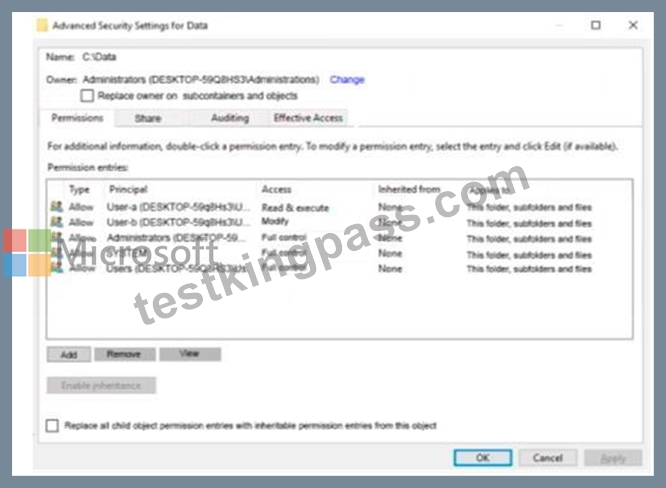
You share the Data folder. The permission for User-a are shown in the User-a exhibit (Click the User-a tab.)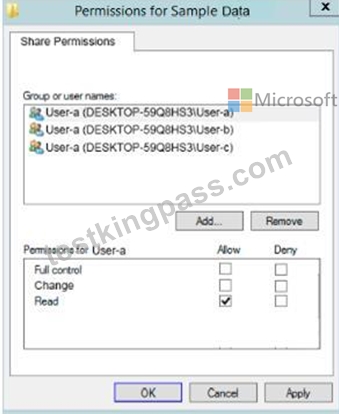
The permissions for user-b are shown in the User-b exhibit. (Click the tab.)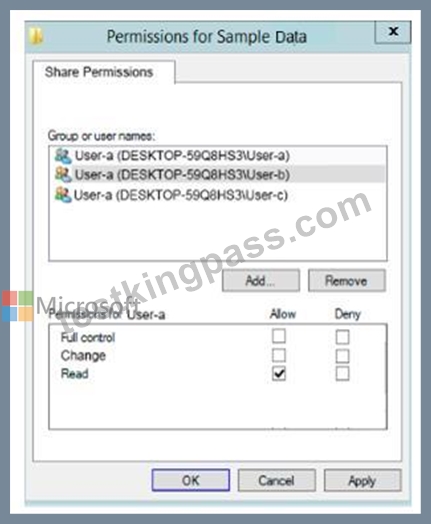
The permissions for user-c are shown in the User-c exhibit. (Click the User-c tab.)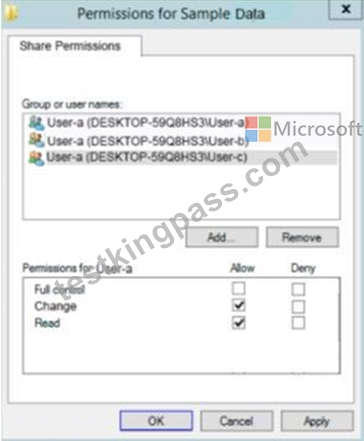
For each of the following statements, select Yes if the statements is true. Otherwise, select No.
NOTE: Reach correct selection is worth one point.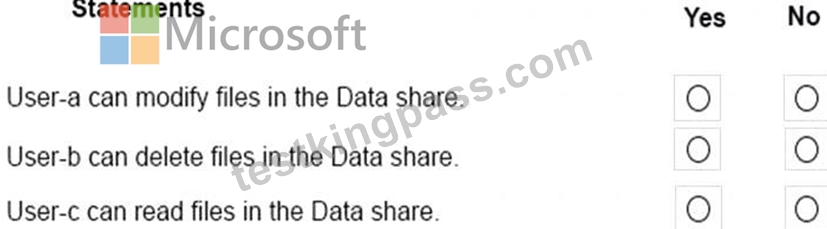
Answer:
Explanation: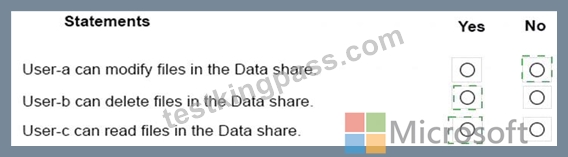
Explanation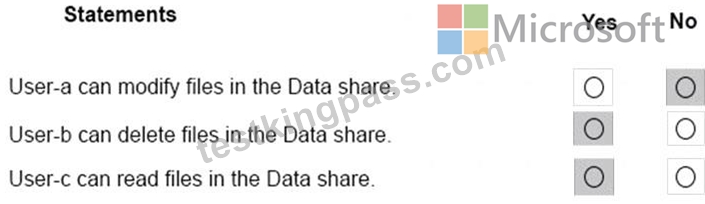
NEW QUESTION 159
You have a public computer named Computer1 that runs Windows 10/ Computer1 contains a folder named Folder1.
You need to provide a user named User1 with the ability to modify the permissions of Folder1. The solution must use the principle of least privilege.
Which NTFS permission should you assign to User1?
- A. Read & execute
- B. Full control
- C. Write
- D. Modify
Answer: B
Explanation:
Explanation
References:
https://docs.microsoft.com/en-us/previous-versions/windows/it-pro/windows-server-2008-R2-and-2008/cc73288
http://www.mdmarra.com/2013/11/full-control-v-modify-why-you-should-be.html
NEW QUESTION 160
You have a computer named LON-CL1.Adatum.com that runs Windows 10.
From Event Viewer, you create a custom view named View1 that has the following filter:
* User: User1
* Logged: Any time
* Event logs: System
* Computer: LON-CL1
* Event IDs: 10000 - 11000
* Event level: Error, Verbose
You open Event Viewer and discover the event shown in the exhibit. (Click the Exhibit tab.)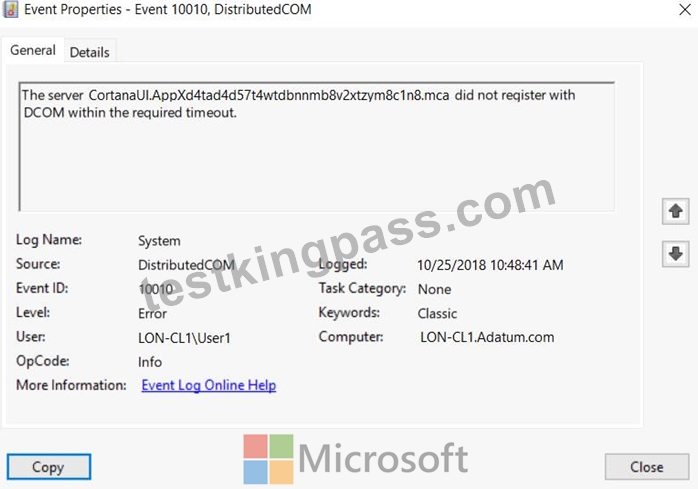
The event does not appear in View1.
You need to ensure that the event appears in View1.
What should you do?
- A. Modify the Computer setting in the filter.
- B. Add a Task Category setting to the filter.
- C. Add the computer account to the Event Log Readers group.
- D. Create an event subscription.
Answer: A
Explanation:
References:
https://www.techrepublic.com/article/how-to-use-custom-views-in-windows-10s-event-viewer/
NEW QUESTION 161
Note: This question is part of a series of questions that present the same scenario. Each question in the series contains a unique solution that might meet the stated goals. Some question sets might have more than one correct solution, while others might not have a correct solution.
After you answer a question in this section, you will NOT be able to return to it. As a result, these questions will not appear in the review screen.
You have a computer named Computer1 that runs Windows 10.
You test Windows updates on Computer1 before you make the updates available to other users at your company.
You install a quality update that conflicts with a customer device driver.
You need to remove the update from Computer1.
Solution: From an elevated command prompt, you run the wusa.exe command and specify the /uninstall parameter.
Does this meet the goal?
- A. No
- B. Yes
Answer: B
Explanation:
Explanation
References:
https://support.microsoft.com/en-us/help/934307/description-of-the-windows-update-standalone-installer-in-wi
NEW QUESTION 162
You have a workgroup computer named Computer1 that runs Windows 10 and has the users shown in the following table.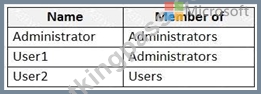
User Account Control (UAC) on Computer1 is configured as shown in the following exhibit.
For each of the following statements, select Yes if the statement is true. Otherwise, select No.
NOTE: Each correct selection is worth one point.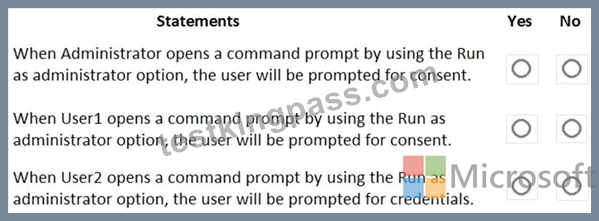
Answer:
Explanation: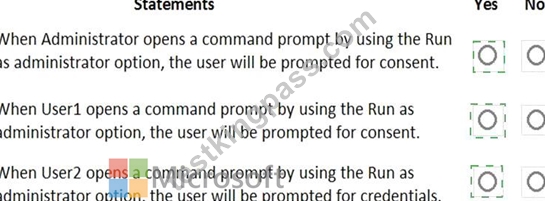
Explanation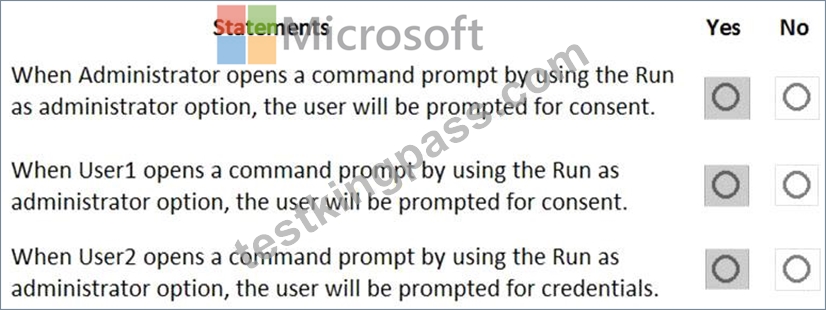
Box 1: Yes
User Account Control: Behavior of the elevation prompt for administrators in Admin Approval Mode is set to Prompt for consent When an operation requires elevation of privilege, the user is prompted to select either Permit or Deny. If the user selects Permit, the operation continues with the user's highest available privilege.
Box 2: Yes
User1 is a member of Administrators group.
User Account Control: Behavior of the elevation prompt for administrators in Admin Approval Mode is set to Prompt for consent When an operation requires elevation of privilege, the user is prompted to select either Permit or Deny. If the user selects Permit, the operation continues with the user's highest available privilege.
Box 3: Yes
User Account Control: Behavior of the elevation prompt for standard users is set to Prompt for credentials (Default) When an operation requires elevation of privilege, the user is prompted to enter an administrative user name and password. If the user enters valid credentials, the operation continues with the applicable privilege.
References:
https://docs.microsoft.com/en-us/windows/security/identity-protection/user-account-control/user-account-control
NEW QUESTION 163
You have a computer named Computer1 that runs Windows 10.
On Computer1 you create a VPN connection as shown in the following exhibit.

Answer:
Explanation:
NEW QUESTION 164
You have a workgroup computer that runs Windows 10.
You need to set the minimum password length to 12 characters.
What should you use?
- A. Local Group Policy Editor
- B. Sign-in options in the Settings app
- C. Credential Manager in Control Panel
- D. Local Users and Groups in Computer Management
Answer: A
Explanation:
Explanation/Reference:
Configure Connectivity
Testlet 1
Case Study
This is a case study. Case studies are not timed separately. You can use as much exam times as you would like to complete each case. However, there may be additional studies and sections on this exam. You must manage your time to ensure that you are able to complete all questions included on this exam in the time provided.
To answer the questions included in a case study, you will need to reference information that is provided in the case study. Case studies might contain exhibits and other resources that provide more information about the scenario that is described in the case study. Each question is independent of the other questions in this case study.
At the end of this case study, a review screen will appear. This screen allows you to review your answers and to make changes before you move to the next section of the exam. After you begin a new section, you cannot return to this section.
To start the case study
To display the first question in this case study, click the Next button. Use the buttons in the left pane to explore the content of the case study before you answer the questions. Clicking these buttons displays information such as business requirements, existing environment, and problem statements. When you are ready to answer a question, click the Question button to return to the question.
Overview
Existing Environment
Fabrikam, Inc. is a distribution company that has 500 employees and 100 contractors.
Active Directory
The network contains an Active Directory forest named fabrikam.com. The forest is synced to Microsoft Azure Active Directory (Azure AD). All the employees are assigned Microsoft 365 E3 licenses.
The domain contains a user account for an employee named User10.
Client Computers
All the employees have computers that run Windows 10 Enterprise. All the computers are installed without Volume License Keys. Windows 10 license keys are never issued.
All the employees register their computer to Azure AD when they first receive the computer.
User10 has a computer named Computer10.
All the contractors have their own computer that runs Windows 10. None of the computers are joined to Azure AD.
Operational Procedures
Fabrikam has the following operational procedures:
* Updates are deployed by using Windows Update for Business.
* When new contractors are hired, administrators must help the contactors configure the following settings on their computer:
- User certificates
- Browser security and proxy settings
- Wireless network connection settings
Security Policies
The following security policies are enforced on all the client computers in the domain:
* All the computers are encrypted by using BitLocker Drive Encryption (BitLocker). BitLocker recovery information is stored in Active Directory and Azure AD.
* The local Administrators group on each computer contains an enabled account named LocalAdmin.
* The LocalAdmin account is managed by using Local Administrator Password Solution (LAPS).
Problem Statements
Fabrikam identifies the following issues:
* Employees in the finance department use an application named Application1. Application1 frequently crashes due to a memory error. When Application1 crashes, an event is written to the application log and an administrator runs a script to delete the temporary files and restart the application.
* When employees attempt to connect to the network from their home computer, they often cannot establish a VPN connection because of misconfigured VPN settings.
* An employee has a computer named Computer11. Computer11 has a hardware failure that prevents the computer from connecting to the network.
* User10 reports that Computer10 is not activated.
Technical Requirements
Fabrikam identifies the following technical requirements for managing the client computers:
* Provide employees with a configuration file to configure their VPN connection.
* Use the minimum amount of administrative effort to implement the technical requirements.
* Identify which employees' computers are noncompliant with the Windows Update baseline of the company.
* Ensure that the service desk uses Quick Assist to take remote control of an employee's desktop during support calls.
* Automate the configuration of the contractors' computers. The solution must provide a configuration file that the contractors can open from a Microsoft SharePoint site to apply the required configurations.
NEW QUESTION 165
Your network contains an Active Directory domain named contoso.com. The domain contains two computers named Computer1 and Computer2 that run Windows 10 and are joined to the domain.
On Computer1, you create an event subscription named Subscription1 for Computer2 as shown in the Subscription1 exhibit. (Click the Subcription1 tab.)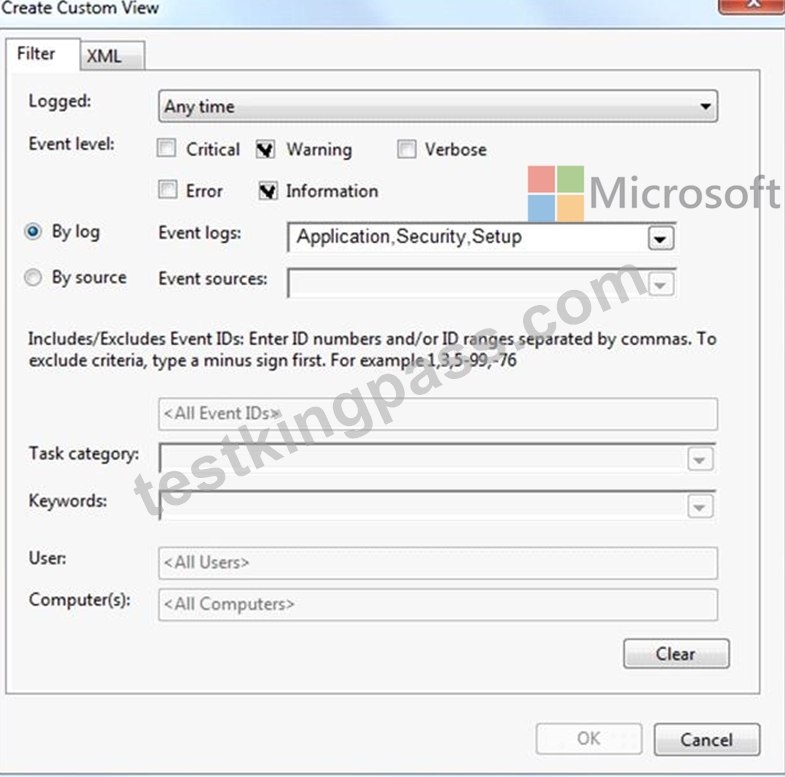
Subscription1 is configured to use forwarded events as the destination log.
On Computer1, you create a custom view named View1 as shown in the View1 exhibit. (Click the View1 tab.)
For each of the following statements, select Yes if the statement is true. Otherwise, select No.
NOTE: Each correct selection is worth one point.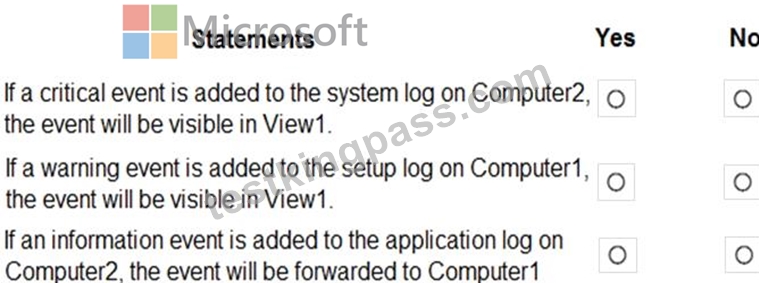
Answer:
Explanation: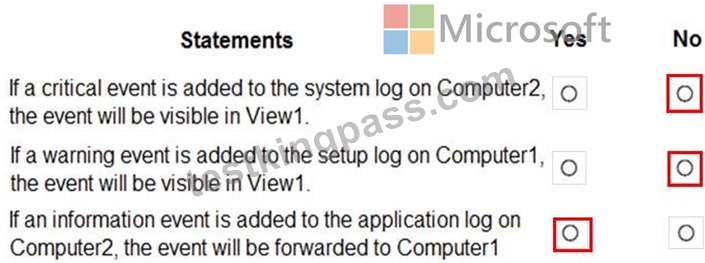
NEW QUESTION 166
You have a computer named Computer1 that runs Windows 10.
Computer1 has the local users shown in the following table.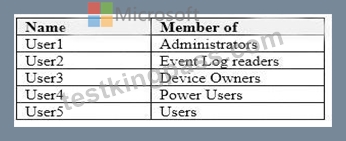
Which users can analyze the event logs on Computer1? To answer, select the appropriate options in the answer area.
NOTE: Each correct selection is worth one point.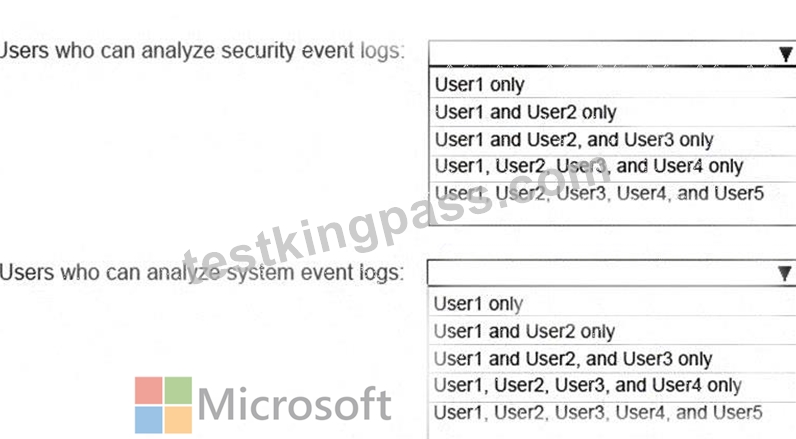
Answer:
Explanation: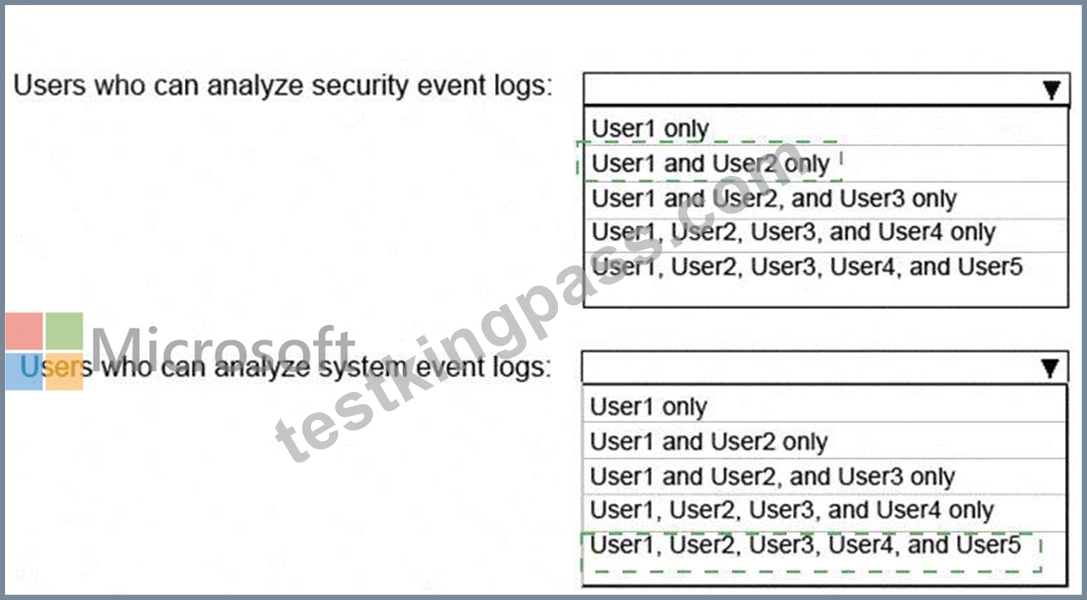
Explanation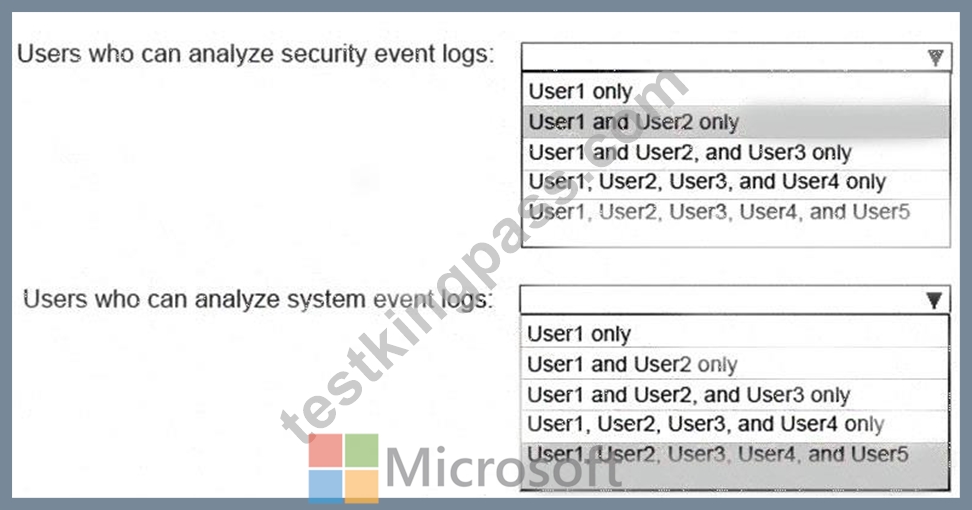
References:
https://docs.microsoft.com/en-us/windows/security/identity-protection/access-control/local-accounts#sec-locals
NEW QUESTION 167
You plan to deploy Windows 10 to 100 secure computers.
You need to select a version of Windows 10 that meets the following requirements:
* Uses Microsoft Edge as the default browser
* Minimizes the attack surface on the computer
* Supports joining Microsoft Azure Active Directory (Azure AD)
* Only allows the installation of applications from the Microsoft Store What is the best version to achieve the goal? More than one answer choice may achieve the goal. Select the BEST answer.
- A. Windows 10 Pro in S mode
- B. Windows 10 Home in S mode
- C. Windows 10 Enterprise
- D. Windows 10 Pro
Answer: D
Explanation:
Explanation
References:
https://www.microsoft.com/en-za/windows/compare
NEW QUESTION 168
......
Guaranteed Success with MD-100 Dumps: https://www.testkingpass.com/MD-100-testking-dumps.html
Pass Microsoft MD-100 Exam – Experts Are Here To Help You: https://drive.google.com/open?id=1_Z4I7XGDOUsLuHd88pEn-foEnwvb9vTO